
How to prevent outdated server inventory risks with efficient server monitoring
At any point in time, your IT teams are constantly working on performance monitoring, security patching, scaling, and related activities. Most teams overlook one critical pillar: a reliable and up-to-date server inventory. Why did we emphasize the phrase "reliable and up-to-date"? Because there are still teams using a spreadsheet that was last updated years ago when a server inventory report is requested.
What follows when you do not maintain an updated server inventory repository is:
- Missed patch cycles
- Difficulty in root cause analysis
- Security blind spots
- Failed audits
- A Pandora's box of other problems
Problems caused by poor server inventory management
In addition to the pain points listed above, here's what can happen when a robust server inventory management setup is not in place.
Incomplete visibility and accountability
When inventory is handled manually or through periodic spreadsheets, servers may be missed, duplicated, or linger as ghost assets. Shadow IT proliferates, and critical endpoints drift out of management, becoming risk vectors.
Security and compliance gaps
Unknown or unmonitored servers may run outdated software, miss vulnerability scans, or hold sensitive data outside official controls. This not only jeopardizes security posture but also puts regulatory compliance at risk during audits.
Operational inefficiency
Troubleshooting incidents is vastly complicated when the inventory is stale—admins waste cycles identifying hostnames, IPs, and ownership. Virtual servers spawning randomly without a dedicated purpose leads to asset churn. This further increases the risk of human error in tracking changes.
Cost overruns
Untracked resources continue to consume licenses, cloud budget, and maintenance contracts. Zombie servers—never decommissioned, always overlooked—translate directly to wasted spend.
Disjointed life cycle management
Without a holistic inventory, tasks like patching, end-of-life disposal, and capacity planning become fragmented, exposing organizations to both technical debt and compliance fines.
Server inventory management best practices
Now that we've covered the difficulties, let's see what an ideal server inventory management setup should look like.
Automate discovery
Use tools with agent-based or network scanning capabilities to continuously discover new and removed servers across physical, virtual, and cloud environments.
Consolidate and normalize data
Aggregate inventories from disparate systems into a unified source—deduplicate entries; standardize naming conventions; and tag assets by environment, owner, and function.
Schedule regular audits and reconciliation
Integrate scheduled scans and compare results with CMDBs or asset registers. Automation should supplement, not wholly replace, periodic human review.
Document life cycle events
Track when assets are provisioned, repurposed, or decommissioned—link inventory to change management and ticketing systems to ensure full traceability.
Integrate with security and patch management
Tie inventory updates to vulnerability scanners, patch tools, and compliance workflows to ensure all servers receive timely updates.
Implement real-time change alerts
Deploy policy-based notifications for inventory changes—new servers joining, servers going offline, or configuration drifts detected.
Why Site24x7's server inventory report is the one-stop solution
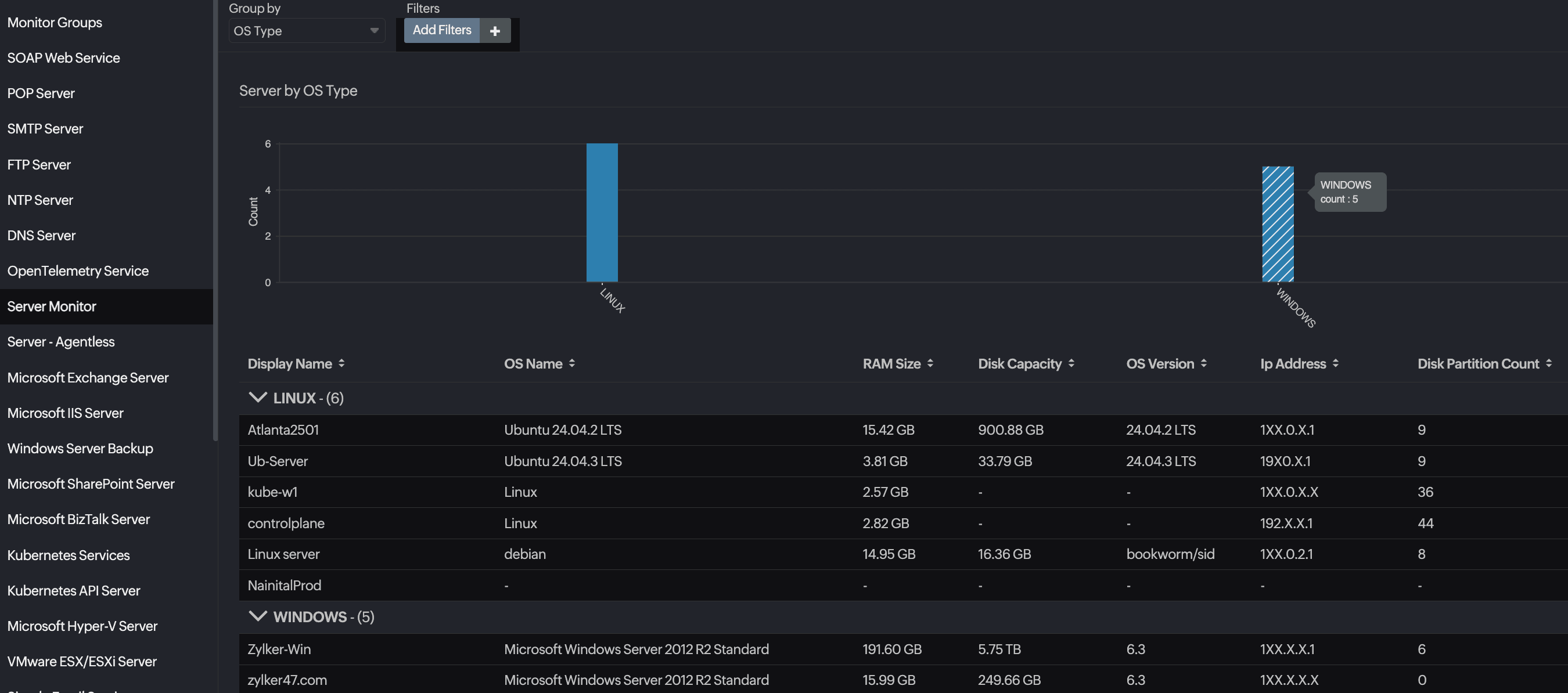
If you do not have a server inventory tool or have an additional tool just to maintain your server inventory, you will love Site24x7. Our server monitoring tool couples as an exceptional server inventory tool and much more.
Site24x7 addresses server inventory management holistically, targeting pain points with automation, accuracy, and actionable visibility:
Continuous, agent-based discovery
Site24x7’s server agents automatically detect, catalog, and update your server inventory in real time—whether physical, virtual, or cloud-based. No manual spreadsheet updates, no overlooked VMs.
Unified dashboard
Get a consolidated view of all assets—see operating system, hardware configuration, installed applications, IPs, geolocation, uptime, and more. Tag or group assets by environment, business unit, or owner for granular management.
Audit and compliance readiness
Instantly download inventory snapshots and change histories for auditors. Site24x7 tracks server additions, decommissions, and status changes—providing a tamper-evident log for regulatory frameworks like the PCI DSS, HIPAA, or ISO 27001.
Proactive life cycle management
Receive automated alerts for underutilized or unresponsive servers, maintain records for patch management, and tie server presence to billing or chargeback systems. Reduce shadow IT and zombie asset risk at scale.
Seamless integration
Connect the inventory module with ticketing, change management, or CMDB platforms through APIs and webhooks, making Site24x7 not just your source of truth but the hub of your IT asset operations.
Invisibility is dangerous
Manual and fragmented inventory management can no longer keep up with the pace of modern hybrid and cloud infrastructure. By placing Site24x7’s automated server inventory reporting at the heart of your IT operations, you ensure up-to-date visibility, security, and cost control—empowering your IT team to focus less on tracking assets and more on strategic improvement.
Comments (0)