
Monitor Oracle OCI Autonomous Database with agent
Site24x7 enables you to monitor Oracle Cloud Infrastructure (OCI) Autonomous Databases by providing visibility into database availability, performance, and resource usage. Using the Site24x7 server monitoring agent, you can collect key metrics and track the health of Autonomous Databases running in OCI.
This document explains how to configure monitoring for OCI Autonomous Databases, including prerequisite checks in the OCI Console, database user creation with required privileges, and agent-based setup for both password-based and mTLS (wallet-based) connections.
Prerequisites
OCI configuration
Before adding an OCI Autonomous Database to Site24x7, ensure to do the steps below:
- Log in to the OCI console and select the appropriate region where the Autonomous Database is hosted.
- Navigate to Oracle AI Database > Autonomous AI Database and select the required Autonomous Database instance.
- Open the DB Connection section of the selected database instance.
- If mTLS authentication is required:
- Download the instance wallet by clicking Download wallet.
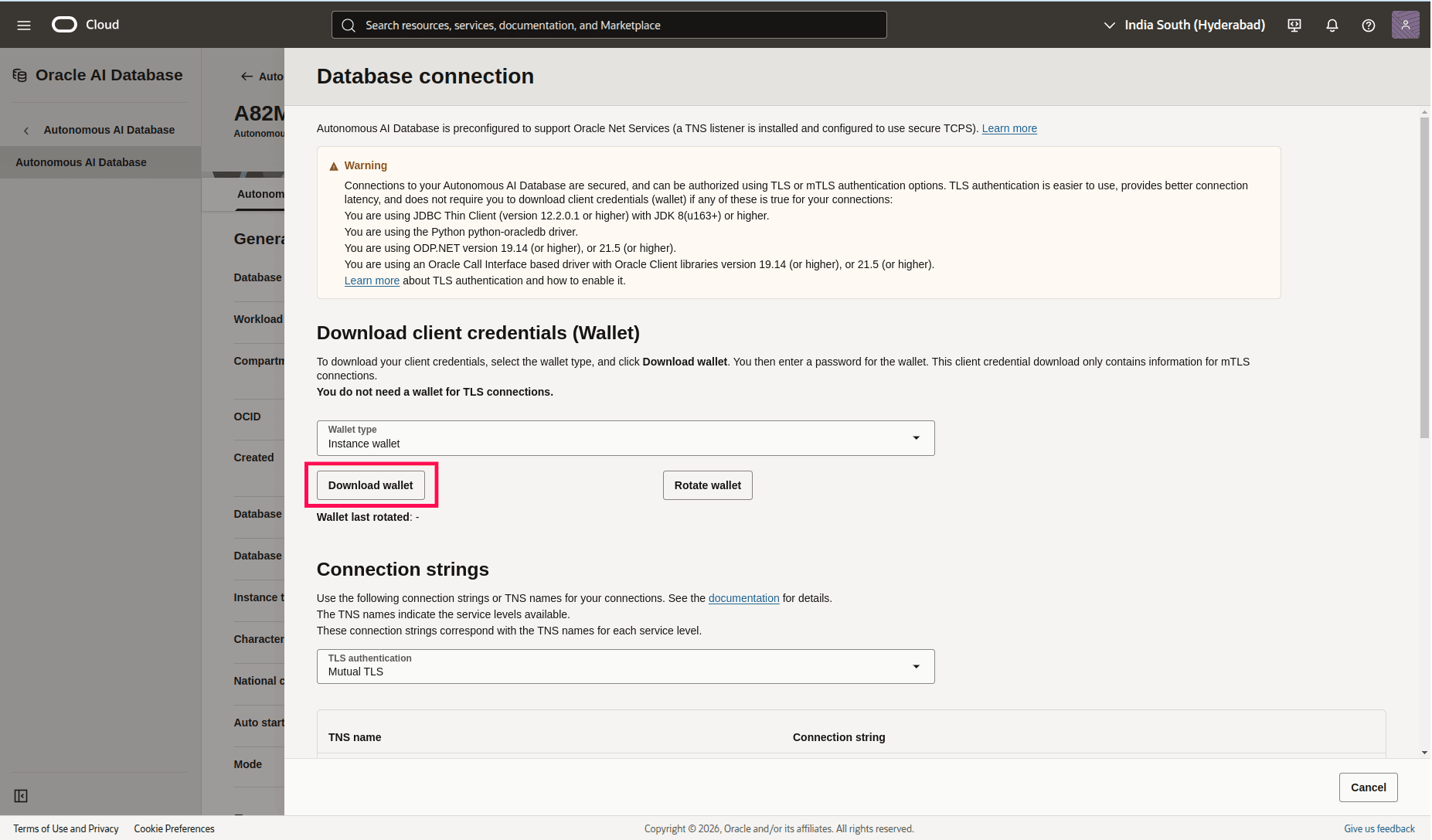
- Set a wallet password during download.
- Extract the wallet ZIP file on the server where the Site24x7 monitoring agent is to be installed.
- Download the instance wallet by clicking Download wallet.
- From the Connection Strings section, note the following details:
- Host
- Port
- Service name
- Protocol (TCP or TCPS)
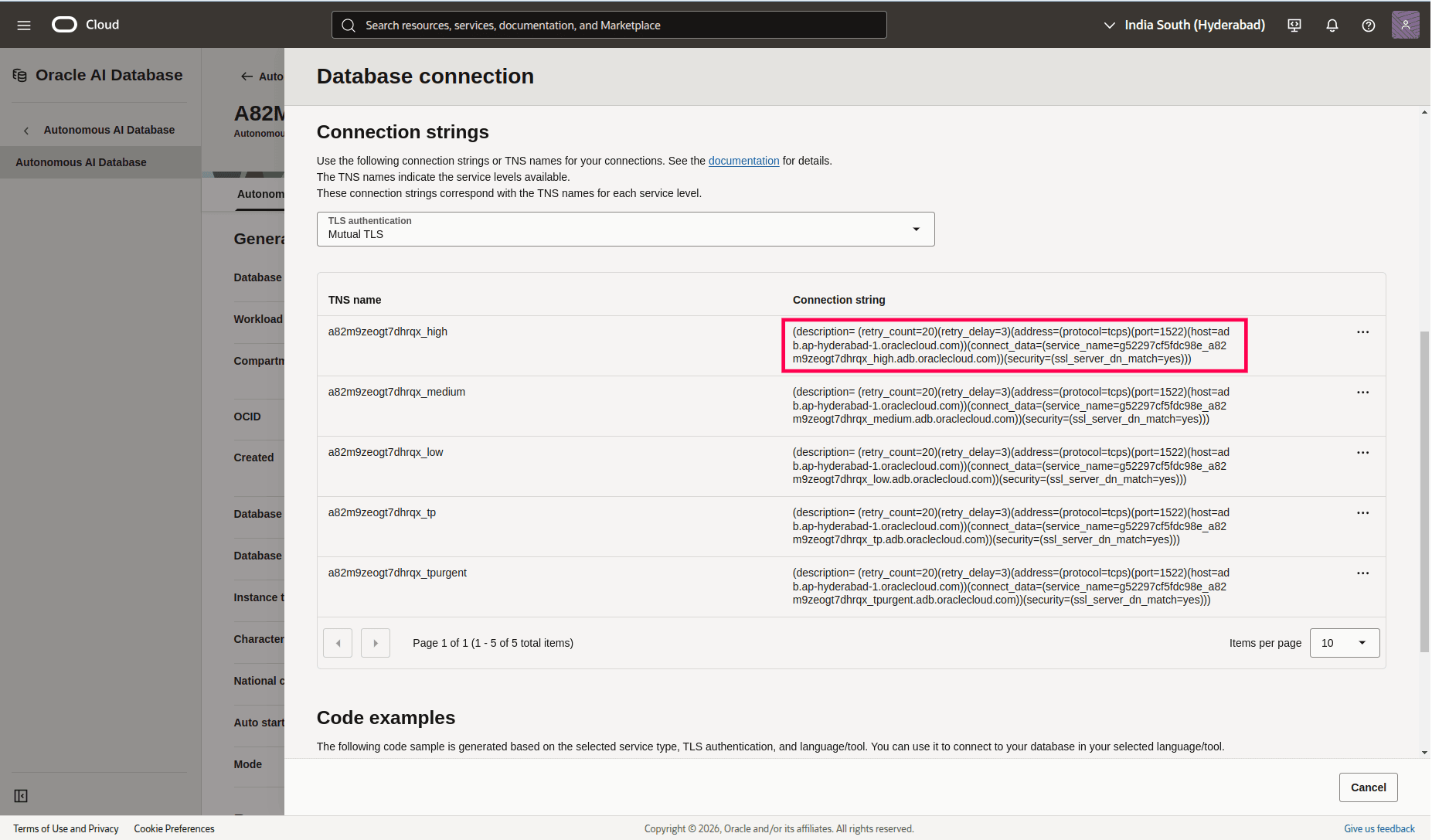
- In the Network section, verify the Access type and ensure the Autonomous Database is reachable from the server in which agent is going to be installed for monitoring autonmous database (public access or private endpoint with required network rules).
Create user and grant access
A dedicated Oracle database user must be created for the Site24x7 server monitoring agent. This user is used only for metric collection and should be granted limited privileges.
- Execute the following command on the Autonomous Database to create a user:
CREATE USER <username> IDENTIFIED BY "<password>";
Example:CREATE USER site24x7 IDENTIFIED BY "Zylker@123";
- Grant the minimum required privileges to allow the Site24x7 agent to collect monitoring metrics: GRANT CREATE SESSION TO <username>;GRANT CONNECT TO <username>;GRANT SELECT_CATALOG_ROLE TO <username>;
GRANT CREATE SESSION TO <username>;
GRANT CONNECT TO <username>;
GRANT SELECT_CATALOG_ROLE TO <username>;
These privileges provide read-only access to system and performance metadata without allowing any administrative changes.
Adding an OCI Autonomous Database monitor
If the Autonomous Database uses mTLS authentication (wallet-based connections), the Oracle client library path must be updated on the Site24x7 agent before adding the database.
- Execute the following command:
/opt/site24x7/monagent/scripts/AgentManager.sh oracledb --update_library_path
- Use the following command to add the OCI Autonomous Database for monitoring:
/opt/site24x7/monagent/scripts/AgentManager.sh oracledb --add_cloud_database
- Enter a unique group name to identify a set of Oracle Cloud databases. All cloud databases added under the same group name are monitored under a single Oracle monitor in Site24x7.
- Provide the following information when prompted:
- Host
- Port
- Service name
- Username
- Password
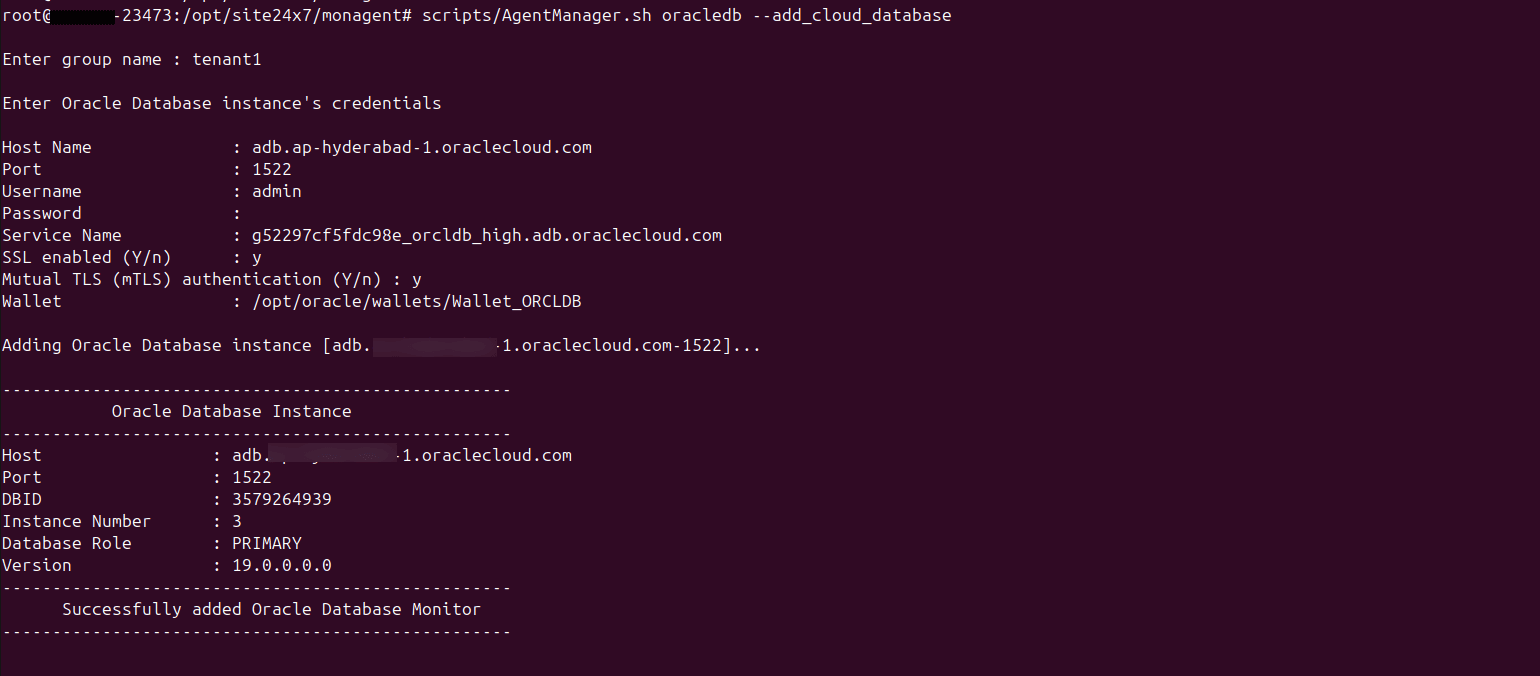
The values for Host, Port, Service Name must match the details noted from the OCI Console connection strings.
SSL configuration
- If SSL is enabled (protocol is TCPS), enter y when prompted.
- If mTLS authentication is required:
Update Oracle Cloud Database configuration
If you need to modify an existing Oracle Cloud Database configuration, run the following command:
/opt/site24x7/monagent/scripts/AgentManager.sh oracledb --update_cloud_database
This command can be used to update connection details, credentials, or wallet paths without re-adding the monitor.
Once the configuration is complete, the OCI Autonomous Database metrics will be automatically discovered and displayed under the corresponding Oracle database monitor in Site24x7.
Note that an oracle database monitor will be created for each Unique group name, which has no data. This will not consume any license.
And every Oracle Autonomous database instance under each group will be added as a child database monitor under that Oracle Autonomous database group.